Tablet PCs have evolved beyond simple video viewing devices to become essential electronics for daily life and work. It is now a common sight to see people listening to lectures on the subway during their commute or writing documents while sitting in a café. However, when it comes time to actually buy a product, many people feel overwhelmed by the choice of screen sizes and specifications. There are also various other factors to consider, from screen-protecting films to gamepads that make operation more comfortable. In this article, we will take a detailed look at how to make the most of a tablet PC in daily life and offer tips on making a smart choice.
=
A Complete Guide to Tablet PC Usage and Smart Selection Criteria
1. Your Intended Use Is the Only Criterion That Matters
The required specifications differ significantly depending on whether a student is using a tablet PC for studying or a professional is working on documents or video editing. If you only need it for listening to online lectures or reading e-books, a product with a sharp screen and lightweight design is far more advantageous than an expensive, high-performance model. On the other hand, if you need to perform complex graphic work or multitask with multiple windows open, you must carefully consider the processor performance and memory capacity. Rather than blindly following a recommendation from a friend, it is important to first reflect on your own lifestyle patterns. For example, if you carry the device in your bag every day, choosing a model that is even a few grams lighter will be better for your shoulder health. In fact, I have seen a colleague who bought a large, expensive model on the assumption that bigger is always better, only to end up storing it in a corner of their home because it was too heavy. Conversely, a friend who bought a smaller device uses it very effectively for language study and reading while commuting. Ultimately, an expensive product is not necessarily the best; the one that fits your hand and lifestyle best is the true premium choice. Try to develop the habit of thinking about which apps you will actually use most often, rather than just looking at the flashy specifications listed in the product description. Going through this thought process alone can prevent unnecessary spending and lead to 100% satisfaction with your purchase.
To avoid disappointment, choose tablet PC specifications based on your actual usage purpose and frequency of portability.
2. Protecting Eye Health with Screen Protectors and Utilizing Peripherals
Staring at a screen for long periods can easily lead to dryness and eye fatigue, which is where a monitor protective film can be a great help. Applying a low-reflection film reduces glare, preventing fluorescent light from reflecting off the screen and helping to protect your vision. This is particularly useful when children complain of eye strain after looking at a tablet PC for a long time while studying; a vision-protecting film is an excellent solution. Protective films also prevent screen scratches, making them essential for keeping the device clean and looking new for a long time. To apply one without bubbles, gently push out air using a card-like tool, and anyone can achieve a clean result. Additionally, for those who enjoy gaming or switch between various devices, a compatible gamepad or headset can be a great boost. Having wireless devices that connect easily not only to smartphones and tablet PCs but also to personal computers can multiply their utility. Using an ultra-lightweight wired headset for listening to music or focusing on online lectures is convenient because it does not put strain on your ears. When choosing equipment, it is best to physically test the connection response speed and the comfort of the grip. Adding just one well-chosen peripheral can transform an ordinary electronic device into a powerful tool tailored to your needs.
Using vision-protecting films and appropriate peripherals together significantly increases user satisfaction.
3. Discovering the Diverse Uses of Tablet PCs in Daily Life
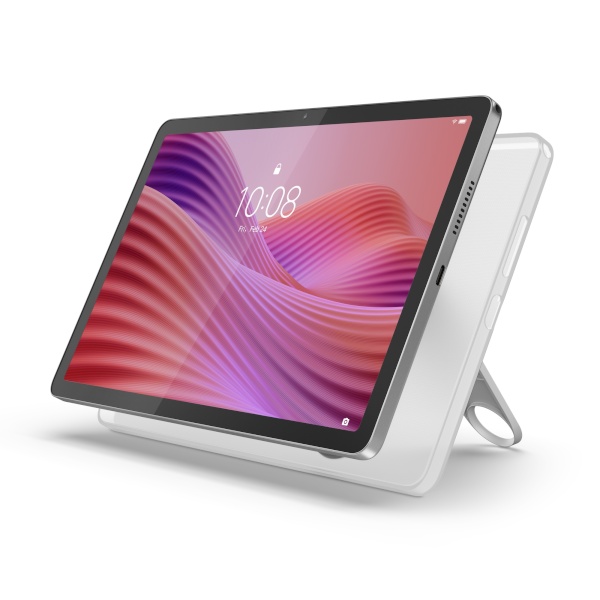
These days, it is easy to find tablet PCs installed in restaurants and cafés for calling staff or placing orders. The method of touching the screen to select menu items and complete payment, without flipping through a paper menu, is no longer strange at all. Digital counters at banks are also actively using these devices as multilingual guides for foreign customers. As electronic devices permeate every corner of our lives, we are seeing faster processing speeds and reduced waiting times. Personally, I find it most convenient to use a tablet as a secondary screen to display recipes while cooking at home. As content consumption methods become more diverse, more people are seeking devices with wider screens than smartphones for watching movies and dramas. Lying in bed on the weekend and watching favorite TV programs in a comfortable position is one of the small pleasures for working professionals. To enjoy the flood of videos from various platforms in line with trends in the pop culture market, people prefer devices with high screen quality. Of course, larger screens offer better immersion, but the choice should vary depending on whether you use the device mostly while moving around the house or carry it in a bag. If you think about the place where you spend the most time in your daily life, the answer will naturally emerge.
Tablet PCs are essential tools that add convenience to all aspects of daily life, from ordering and finance to leisure.
4. Hidden Costs and Conditions to Check Before Purchase
When buying electronic devices, people often focus only on the price of the main unit, only to be surprised by additional costs later. The budget can balloon quickly when you need to buy a protective case, a screen film, and a dedicated stylus for writing or drawing. In particular, while genuine manufacturer accessories offer high quality, they are quite expensive, so it is necessary to set a generous total budget in advance. If you choose a cellular model, monthly data fees to the carrier become a fixed expense, requiring careful judgment. If you do not use the internet much outside, choosing a Wi-Fi-only model and connecting it to your smartphone is much more economical. The warranty period and after-sales service policies in case of malfunction are also important factors that must be considered before purchase. Even if a product has excellent performance, it can be a major setback if the repair cost for a broken screen is comparable to the price of the device itself. Carefully reading reviews from internet communities and actual users allows you to easily identify chronic weaknesses or repair experiences. Taking advantage of discount events at large discount stores or online shopping malls can help you get the device at a price much lower than the regular price. Thorough information gathering and price comparison are the most certain and fastest shortcuts to becoming a smart consumer.
You must carefully check hidden expenditure factors such as accessories and repair costs in addition to the main unit price.
5. Tips for Maintenance and Cleaning to Ensure Long-Term Durability
If you have bought an expensive electronic device, how you manage and clean it can extend its lifespan by several years. Leaving fingerprints or dust on the screen can lead to poor touch recognition or bacterial growth, so periodic wiping is necessary. Gently wiping the screen with a microfiber cloth or eyeglass cleaning cloth lightly dampened with a dedicated electronic cleaner will keep it looking like new. Using a cleaner with a high alcohol content can strip the liquid crystal coating, so it is safe to use only dedicated products. To extend battery life, it is advisable to charge it periodically rather than letting the remaining charge drop to zero. Condensation that occurs when moving from a cold outdoor environment in winter to a warm indoor space is also one of the main causes of electronic device failure. Due to sudden temperature changes, moisture can form on the internal circuits, so it is best not to turn on the device immediately after entering a room. When carrying the device in a bag, always use a pouch with cushioning to prevent the exterior from being scratched by other hard objects. When packing a charger for travel or outings, coil the cable carefully to prevent it from bending, which can help prevent wire breakage. Electronic devices respond faithfully to the user’s care with a long lifespan, proportional to the small amount of attention and effort invested.
Periodic screen cleaning and proper battery charging habits determine the lifespan of a tablet PC.
6. Creating a Smart Daily Life with the Perfect Tablet PC for You
Tablet PCs, with their various functions and advantages, are excellent partners that can elevate the quality of life if used correctly. Instead of impulsively buying one just because everyone else is, consider what kind of changes it can bring to your life. It can serve as a reliable study tool for students and a mobile office for professionals, allowing them to work anytime, anywhere. As technology advances, new features are expected to be added continuously to make our lives even more convenient. Based on the topics discussed today, I hope you will make a smart choice that is truly necessary for your daily life. I encourage you to experience the small but certain convenience that a single small electronic device can bring.
Through smart selection and utilization, a tablet PC becomes the ultimate partner for enhancing quality of life.
Frequently Asked Questions
=