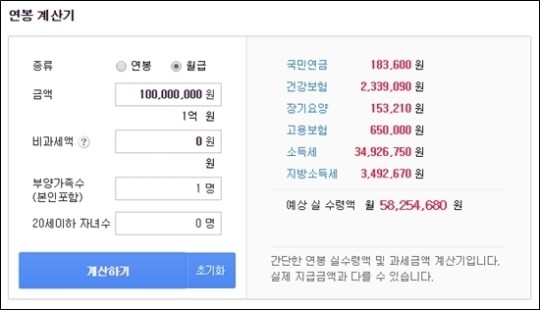
As of 2026, if you simply input your total gross salary into the Four Major Insurance calculator, the resulting deductions will inevitably differ significantly from those shown on your actual pay stub. The amount deposited into office workers’ bank accounts each month is the net pay, which has taxes and various deductions subtracted. If you rely solely on simple calculators on portal sites, you are likely to be caught off guard by unexpected discrepancies. The National Pension insurance rate has been increased to 9.5% compared to last year, and the structure where employers and employees each bear half of the cost has changed, meaning the calculation method must also be updated. If you blindly input the total amount without excluding non-taxable allowances, you will face results that are significantly inflated compared to the actual deduction amounts. Through this article, we will thoroughly understand why the numbers on the calculator and the actual pay stub differ and master the techniques for calculating the exact net pay. By breaking down the principles of Four Major Insurance deductions, which may seem complex, one by one, we can cultivate smart financial habits that protect our wallets.
=
How to Use the 2026 Four Major Insurance Calculator and How to Minimize Discrepancies in Net Pay on Pay Stubs
1. Changes in 2026 National Pension Rates and Employee Burden Ratios
With the National Pension insurance rate increasing from the previous 9% to 9.5%, the deductions actually felt by office workers have changed noticeably. According to the revised regulations, it is legally stipulated that corporate members must share the burden equally, with both the employer and employee contributing 4.75% each. For example, if an office worker’s standard monthly income is 3 million won, multiplying the employee’s share of 4.75% results in exactly 142,500 won being withheld each month. Compared to the previous 9% system, the amount deducted monthly has increased slightly, making this a figure that must be considered when negotiating annual salaries or preparing for a job change. Many people miss this subtle rate change and continue to use Excel formulas based on last year’s rates, leading to confusion every payday. To calculate the pension amount deducted from your account without error, you must consider the exact upper and lower limits of the standard monthly income designated by the state. The increase in National Pension contributions is not just about the monthly outflow increasing; it is a critical issue directly linked to long-term retirement planning. Among young office workers, the number of people checking in advance via smartphone how much their pension will be in the future is steadily growing. Calculating how the insurance premiums paid diligently during employment will return in retirement can also be a great source of vitality in working life. You should develop the habit of not just glancing at the National Pension item in the corner of your monthly pay stub, but directly verifying with your own eyes whether your burden amount has been calculated accurately. The process of reviewing whether the company has properly completed its reporting is a natural right that office workers should enjoy and the first step in wise asset management.
From 2026, the National Pension insurance rate has increased to 9.5%, with employees bearing 4.75%. Therefore, you must always verify if the latest rate is applied when using the calculator.
2. The Difference in Amounts Created by Separating Taxable Income and Non-Taxable Allowances

The most common mistake made when using the Four Major Insurance calculator is including non-taxable allowances, such as meal expenses or self-driving subsidies, in the total monthly salary. Non-taxable items, which are not subject to tax, should inherently be excluded from the standard income for calculating the Four Major Insurance. If you carelessly sum them up, the calculation results become a mess. For instance, even though there is a limit on non-taxable meal expenses, if you mistakenly input the entire welfare benefit amount as taxable salary into the calculator, the result will be much higher than the actual deduction amount. It is essential to open your pay stub and carefully check, line by line, how the taxable and non-taxable amounts are divided. If this distinction is not clear, the figures output by the portal site’s simple simulation calculator will never match the results calculated by the company’s accounting program. In fact, the majority of complaint posts on office worker communities state that the amount calculated using simple annual salary calculators on Naver or Daum differs from the actual amount deposited. Since calculators apply a uniform rate based on the simple total amount entered by the user, they cannot reflect individual non-taxable limits or bonus fluctuations. Since the nature of allowances varies slightly from company to company, discrepancies inevitably arise between the total compensation standard reported by the HR team and the figures estimated by individuals. If you want accurate calculations, you must use the official simulation tools provided by the National Tax Service’s Hometax or the National Health Insurance Corporation and input the detailed items directly. Only by accurately separating non-taxable allowances and inputting only taxable income into the calculation formula can you derive a precise net pay that matches down to the won.
If you input the entire monthly salary into the calculator without separating non-taxable allowances from taxable income, a large discrepancy will occur with the actual deduction amount. Therefore, you must input the detailed items separately.
3. Understanding the Exact Roles of Employee Burden and Company Burden

When you receive your pay stub, it is often confusing whether the amounts listed under National Pension, Health Insurance, and Employment Insurance are all paid by you or shared equally with the company. The Four Major Insurance is fundamentally designed as a structure where employees and employers jointly share the funding, imposing a certain ratio of obligation on both sides. Health insurance premiums and employment insurance premiums are also strictly divided into employee and employer shares according to statutory rates, while workers’ compensation insurance is borne entirely by the employer. When using a simple simulation calculator, you should not just look at the total amount vaguely but clearly distinguish how much you are actually burdened with as the employee’s share. Occasionally, there are incidents where people sigh that their salary is too low because they mistakenly interpret the employer’s burden as their own expense. From the company’s perspective, the monthly Four Major Insurance employer burden for managing dozens of employees can be a massive fixed cost. In particular, in construction or manufacturing sites, calculating and settling accurate insurance premiums every month due to the frequent entry and exit of daily wage workers is a very difficult task. Recently, specialized practical tools that help with complex construction industry employment and workers’ compensation insurance final settlements or HR and labor management for free have become popular to resolve these on-site difficulties. Individual employees need to focus on the deduction amount of approximately 4.75% that they bear, while employers need the wisdom to thoroughly manage the total employer burden relative to total labor costs. You must accurately know which items each side bears at what ratio to avoid questions about settlement amounts during year-end tax settlement or upon mid-term resignation.
The Four Major Insurance is strictly divided into employee and employer burdens. Therefore, when looking at the calculator, you must verify by subject how much deduction you are actually paying.
4. How to Handle It When Pay Stub and Calculator Results Never Match
Even if you accurately input all rates and thoroughly separate non-taxable allowances, there are often cases where the numbers on the pay stub and the calculator results are slightly off. The decisive reason for this phenomenon is the Health Insurance year-end settlement and various settlement systems based on the previous year’s total compensation. Every spring, the state recalculates health insurance premiums based on the total compensation actually received in the previous year, collecting additional amounts or issuing refunds. Therefore, the current month’s pay stub reflects the previous year’s settlement amount temporarily in addition to the usual insurance premiums up to the previous month, which inevitably differs from the calculator figures. Additionally, cumulative differences of a few hundred won can occur due to the application method of simple tax tables for local income tax or income tax. In such cases, it is wise to directly inquire with the company’s HR or accounting department and request the exact calculation basis, rather than simply assuming the calculator is wrong. It is also common to miss the part where long-term care insurance premiums are linked to the health insurance premium amount and adjusted slightly, requiring multi-faceted review. It is also possible that the performance pay or special bonus you received caused a sudden change in the taxable standard for that month, slightly crossing the insurance premium rate bracket. If office workers themselves understand the flow of these administrative settlement processes, they can handle sudden increases in deductions calmly and composedly. Since the calculator is merely a simulation tool that shows estimates, the final verification connecting the actual bank balance and the pay stub flow is your responsibility.
Discrepancies can occur between the calculator and the actual pay stub due to previous year compensation settlements or local income tax linkage. Therefore, you must understand the characteristics of the settlement system.
5. Smart Tips for Calculating Net Pay Using Smartphones and PCs
In busy daily life, being able to instantly calculate Four Major Insurance deductions and net pay by tapping a smartphone screen a few times without turning on a PC is an essential survival skill for modern office workers. Since simply entering your annual or monthly salary into a portal site search bar makes it difficult to reflect detailed conditions, it is better to add professional financial calculation platforms to your bookmarks. You must use a detailed simulation calculator where you can carefully input your age, number of dependents, and non-taxable salary items to obtain error-free results. Utilizing comprehensive financial calculation tools that can manage retirement benefits, loan repayments, and various deposit maturities at once maximizes the efficiency of asset management. The steps of office workers who simulate their net pay on a smartphone screen while planning job changes or savings are becoming lighter. Furthermore, going beyond simply relying on calculators made by others, creating and managing your own Excel formulas is also an excellent financial study. If you build a template where you pre-input the latest 2026 Four Major Insurance rates into cells and only change the base salary and allowances to automatically output the net pay, you can use it usefully for a lifetime. Instead of wasting time looking up various calculators and finance books separately, you must cultivate the ability to input your specific conditions, ask questions, and derive results. You must actively utilize mobile calculation environments that update immediately whenever there is a salary change to develop the sense of controlling the flow of your assets in real time. Those who build their own financial calculation system in line with the digital environment will ultimately save more money and grow it efficiently.
Using detailed calculation tools on smartphones and PCs where you can input specific conditions and building your own calculation template makes asset management much easier.
6. Essential 2026 Office Worker Finance: The Future of Mastering the Four Major Insurance
The ability to skillfully handle the Four Major Insurance calculator is not just about satisfying curiosity; it is a core shield protecting your precious assets in the fierce economic environment of 2026. You must accurately understand the principles of the money automatically deducted from your pay stub every month to prevent unnecessary leakage and secure your rightful share. To remain unshaken amidst huge trends such as National Pension rate increases and changes in various tax benefits, a posture of continuously acquiring and checking related information is necessary. In the future, office workers must transform into independent economic agents who verify their net pay themselves, rather than simply accepting what the company gives. More refined and customized practical calculation tools will emerge in the coming future, and how well you utilize them will determine the success or failure of your financial management. I encourage you to become a true financial expert through the small practice of opening your pay stub starting today and checking taxable income and deductions one by one.
Fully mastering how to use the Four Major Insurance calculator is an essential asset defense strategy for office workers in 2026, and a consistent habit of verification leads to wealth accumulation.
Frequently Asked Questions
=